
How do software supply chain attacks happen?
Most people think of cyber attacks as something that targets a password, a computer, or a website directly. Software supply chain attacks work differently. They involve trusted software, updates, plugins, development tools, code repositories, automation systems or third party services that already have access to important systems.
This guide explains how these attacks happen, why trusted tools can become attractive targets, and what practical controls help reduce the risk.
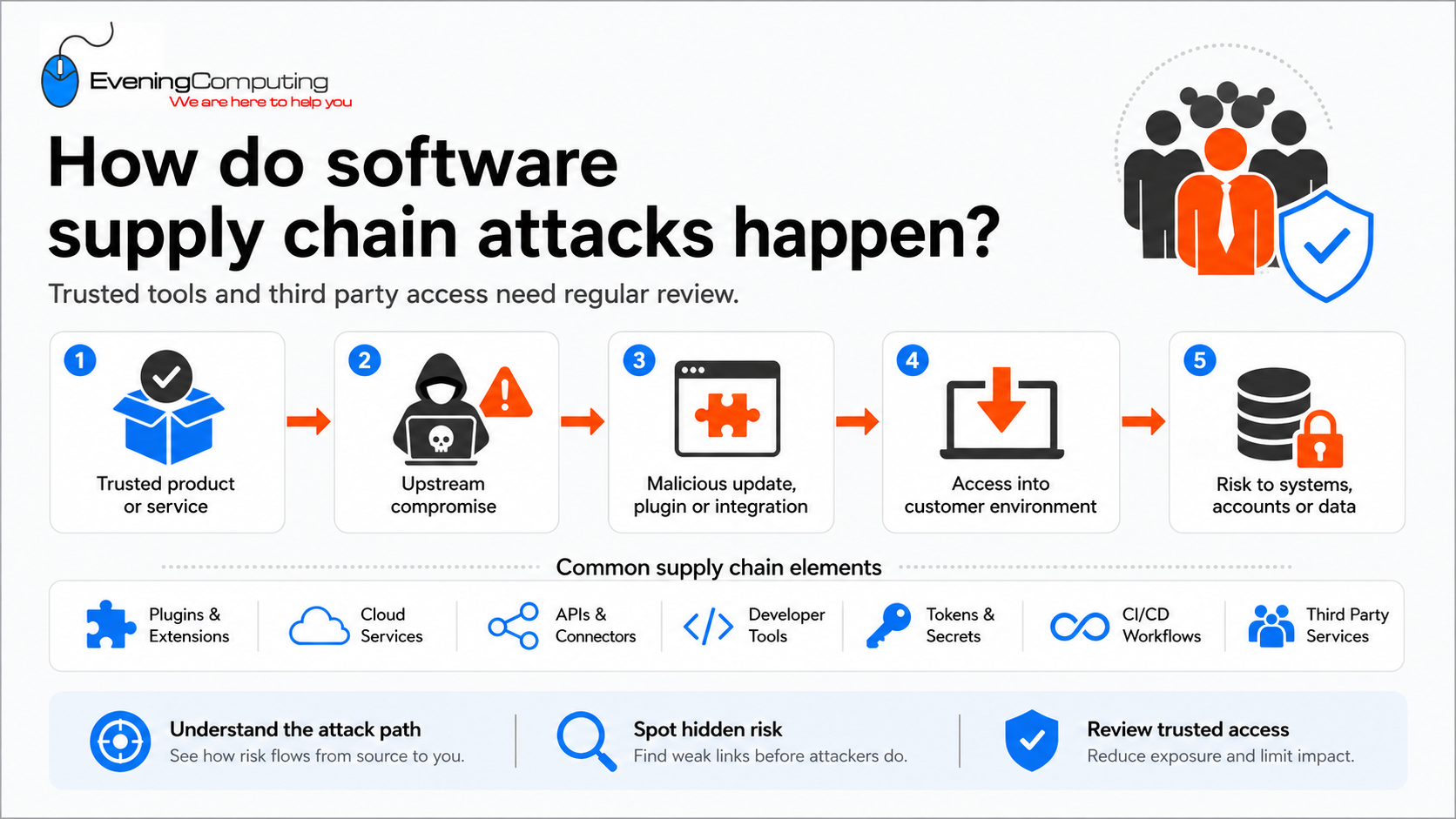
Supporting visual reference. This image summarises the topic at a high level. The written guide below provides the full explanation and practical guidance.
Browse this guide
Use the links below to jump to the section most relevant to your question.
- What is a software supply chain attack?
- Why attackers target trusted tools
- Why developer tools and security tools can be high value targets
- Why API keys, tokens and secrets matter
- How this affects small organisations
- What supplier and third party review should include
- Practical steps to reduce risk
- What this does not mean
- Further reading
- Need help with something covered in this guide?
- Further Guidance and Support
What is a software supply chain attack?
A software supply chain attack happens when attackers compromise a product, service, supplier or technical dependency that other organisations already trust. Instead of attacking every final organisation directly, the attacker targets something that already has a legitimate route into those environments.
A simplified path looks like this:
Organisation chooses a trusted product, supplier or service
↓
The product is allowed to install, update, connect or access information
↓
An attacker compromises part of that trusted supply chain
↓
A malicious change, credential or instruction travels through the existing trusted path
↓
The customer environment may accept activity that would otherwise appear suspicious
↓
The compromise can reach systems, accounts or information downstream
The compromised part of the chain could be a software update, plugin, code library, browser extension, development tool, build workflow, supplier account, cloud application or third party integration.
The important mechanism is inherited trust. The organisation has already made a decision to trust something upstream. If that trusted component is later compromised, some of the access already granted to it may also become useful to the attacker.
This is why supply chain attacks can be difficult to recognise quickly. The software, account or service involved may still have a familiar name and may still be using a connection or deployment process that was previously legitimate.
Why attackers target trusted tools
Trusted tools are attractive targets because they often sit close to important systems. They may already be permitted to run automatically, communicate through security controls, access cloud services, read configuration information, deploy software, perform backups or interact with administrator accounts.
This creates a different security problem from an obviously malicious attachment or unfamiliar application. In a supply chain attack, the software or service may already be approved, widely used and expected to perform sensitive actions.
Keeping trusted software supported and updated remains essential because updates correct known vulnerabilities and other software problems. However, fully updated does not mean invulnerable.
Complex software can contain weaknesses that have not yet been discovered, vulnerabilities for which an effective fix is not yet available, or defects that attackers learn to exploit before customers can be protected. A supplier’s development, update or distribution process may also itself become part of an attack.
This does not mean organisations should avoid software updates. Delaying legitimate security updates can leave known vulnerabilities exposed. The important point is that updating is one security layer, not proof that the complete software supply chain cannot be compromised.
Supply chain security therefore applies well beyond software developers. Websites, cloud platforms, password managers, browser extensions, backup systems, remote access tools, security products, plugins and other third party services can all become part of an organisation’s trusted technology chain.
Why developer tools and security tools can be high value targets
Developer tools and security tools can be especially attractive because they often handle sensitive information. They may scan infrastructure files, run inside build pipelines, access repositories, store configuration data, connect to cloud platforms or hold tokens used by automated systems.
A 2026 report by The Register documented a supply chain campaign affecting security and developer tools, including Trivy, KICS, Checkmarx related tooling, GitHub Actions, Open VSX plugins and Bitwarden CLI. The report highlighted how this type of compromise could expose developer secrets, cloud credentials, SSH keys, Kubernetes configuration files, GitHub tokens, CI secrets, npm publishing access and downstream environments.
The important lesson is not limited to those specific tools. It is that useful tools can become powerful access points if they are compromised, over privileged, or connected to systems without enough review.
Security tools should therefore be treated as powerful tools, not automatically safe tools. Their access should be understood, limited where possible, and reviewed over time.
Why API keys, tokens and secrets matter
A password is not the only form of access. Modern systems often use keys, tokens and stored credentials so that services can connect automatically without a person typing a password each time.
Examples include API keys, access tokens, refresh tokens, SSH keys, app passwords, OAuth consent, cloud credentials, CI secrets, backup codes and configuration files.
These items may allow one system to access another system. If they are exposed, copied, stored insecurely or left active after they are no longer needed, they can become a way into cloud services, code repositories, websites, backup platforms or business data.
For small organisations, the practical point is that access should not only be reviewed at user account level. Third party apps, plugins, automation tools and integrations may also hold access that needs to be understood.
How this affects small organisations
A small organisation may not write software or run a development team, but it can still depend on software supply chains. Most organisations use third party platforms and tools every day.
Examples include WordPress themes and plugins, browser extensions, website forms, payment plugins, email marketing integrations, Microsoft 365 apps, Google Workspace apps, backup platforms, remote access tools, security tools, DNS platforms, CDN platforms, accounting integrations and supplier portals.
The risk is not that these tools should be avoided. The risk is that access can accumulate quietly. Old plugins may remain installed. Unused integrations may keep permissions. Supplier accounts may stay active after a project ends. Admin consent may be granted once and never reviewed again.
Good security means knowing which tools are connected, what they can access, whether they are still needed, and who is responsible for reviewing them.
What supplier and third party review should include
Supplier and third party review should not only ask whether a tool or service is useful. It should establish what the organisation is trusting the supplier to do, what access has been granted, and what would happen if that trust became unavailable or unsafe.
A useful review path is:
What does the supplier or service provide?
↓
What systems, accounts or information can it access?
↓
What permissions or credentials make that access possible?
↓
What would be affected if the supplier were compromised or unavailable?
↓
How could access be revoked or isolated?
↓
How would important information or operations be recovered or continued?
For important tools and suppliers, the review may therefore include:
• administrator and privileged access
• third party application permissions and cloud app consent
• API keys, access tokens and stored credentials
• remote support or unattended access
• backup access and the ability to delete or alter backups
• access to websites, DNS, email, files or customer information
• who approved the access and who is responsible for reviewing it
• whether subcontractors or other downstream suppliers are involved
• where important information is stored or processed
• breach and incident notification arrangements
• available security documentation or independent assurance.
The review should also consider continuity and recovery:
• Can the organisation still access its important information if the supplier becomes unavailable?
• Is important data independently backed up where appropriate?
• Can supplier or application access be revoked without losing administrative control of the underlying service?
• Are recovery accounts and important administrative credentials controlled by the organisation rather than solely by the supplier?
• Is important configuration information documented?
• Is there an alternative way to continue an essential function if the supplier is temporarily unavailable?
Small organisations may not be able to examine a large provider’s internal infrastructure directly. Available security documentation, independent assurance, contractual commitments and incident notification arrangements can therefore provide useful evidence, but they cannot remove the organisation’s own dependency on the service.
This does not need to become an enterprise scale supplier-management process. The practical objective is to avoid unmanaged trust. If a supplier, application, plugin, browser extension, remote support tool or cloud integration can reach important systems or information, its access and the organisation’s dependency on it should be visible and reviewed periodically.
Practical steps to reduce risk
Reducing software supply chain risk starts with understanding which products, services and suppliers have trusted access. This includes software installed on devices, website plugins, cloud applications, browser extensions, backup systems, remote support tools, integrations and suppliers with administrative access.
Useful preventive controls include:
• keep an inventory of important third party applications, plugins, extensions and integrations
• remove tools and connections that are no longer needed
• limit administrator and privileged access to what is genuinely required
• use separate administrator accounts where appropriate
• review third party app consent and permissions in services such as Microsoft 365 and Google Workspace
• rotate exposed, old or unnecessary API keys, tokens and secrets
• avoid storing sensitive credentials or secrets in unprotected documents or plain text files
• keep supported operating systems, applications, WordPress components and other software updated
• obtain software, plugins and extensions through known and appropriate sources
• use MFA or stronger authentication for important administrative accounts
• enable useful logging and alerts where available
• periodically review supplier and remote access.
Updates remain an important part of this approach, but updating should not be interpreted as proof that the software contains no unknown vulnerability or that the supplier’s wider development and delivery process cannot be compromised.
Prevention should therefore be combined with detection, containment and recovery:
Prevent
limit unnecessary trust and keep supported systems current
↓
Detect
use logs, alerts and endpoint or service monitoring to identify unusual behaviour
↓
Contain
know how to disable an integration, revoke a token, block an account or isolate an affected device
↓
Recover
restore important information, systems and access through known recovery processes
↓
Learn
establish how the trusted path was abused or failed
↓
Improve
reduce unnecessary permissions, improve monitoring and adjust the supplier or technical arrangement
Recovery should include more than having a copy of important files. Depending on the service, it may also require independent backups, tested restoration, administrative recovery accounts, copies of important configuration information, supplier contact details and a practical way to continue essential operations while an affected service is unavailable.
These controls reduce risk, but they cannot guarantee that a supply chain incident will never occur. Technology changes, software changes, suppliers change and new vulnerabilities continue to be identified. The security objective is therefore both to reduce the likelihood of compromise and to preserve a credible recovery path if a trusted component still fails.
What this does not mean
Software supply chain risk does not mean that open source software is unsafe by default, that commercial software is automatically safer, or that organisations should avoid using third party products and cloud services.
It also does not mean that a fully updated product should be considered unsafe simply because supply chain attacks are possible. Applying supported security updates remains an important way to reduce exposure to known vulnerabilities.
The important distinction is that trusted does not mean incapable of compromise.
A reputable supplier, familiar application or security product may still depend on complex software, development systems, cloud infrastructure, libraries, accounts and other suppliers. Weakness or compromise at one point in that chain can sometimes affect organisations further downstream.
Small organisations do not need the same supply chain governance processes as large software companies. They do, however, benefit from knowing:
• which important suppliers and tools they depend on
• what access those tools have
• whether that access is still necessary
• how unusual behaviour would be detected
• how access could be revoked or contained
• how important systems and information could be recovered.
The aim is not to reject useful technology. The aim is to avoid unmanaged trust and unmanaged dependency.
Further reading
The following sources may be useful if you would like to explore the standards, terminology, and real world examples in more detail.
- NCSC: Assessing supply chain security
- NCSC: Preventing lateral movement
- The Register: Ongoing supply chain attack targeting security and developer tools
- CISA: Software supply chain security guidance
- OWASP: Software Component Verification Standard
- OWASP: Top 10 CI/CD Security Risks
- GitHub: Secret scanning documentation
- Microsoft: Review permissions granted to enterprise applications
- Microsoft: Configure how users consent to applications
Need help with something covered in this guide?
A guide can explain the issue and outline useful checks, but some situations need the actual device, account, service, website, network or supplier arrangement to be reviewed. Evening Computing can help review what is happening and advise on suitable next steps before changes are made.
Further Guidance and Support
This guide forms part of a broader layered security approach. For structured guidance on security and resilience planning, see our Security and Resilience page.
For information about practical implementation and ongoing support, you can review our IT services and local IT support coverage across London, Hertfordshire, and Essex.
Author
Elías Sánchez
IT Support Consultant
Evening Computing
This guide was prepared by Elías Sánchez with research and drafting assistance from AI tools. All technical content has been reviewed and adapted for clarity and accuracy.
Last reviewed
17 August 2026