
What is layered security and why does it matter
Understanding layered security
Layered security is the idea that modern technology is safer when protection does not depend on one setting, one product, one login, or one supplier.
A website, computer, phone, business network, cloud account, or email system usually depends on many connected parts. Some of those parts are visible to the user, while others sit in the background and are only noticed when something goes wrong. Because of that, security is rarely about one control being turned on. It is usually about several controls working together so that one weakness does not automatically become a much larger problem.
This guide explains what layered security means, how it works in practice, why it matters across real systems, and why the idea applies not only to websites but also to devices, browsers, online accounts, home networks, office networks, cloud services, and third party technology suppliers.
Layered security is often also referred to as defence in depth. The wording varies, but the central idea is the same: different controls protect different parts of the system, and no single control should be expected to carry the whole security burden.
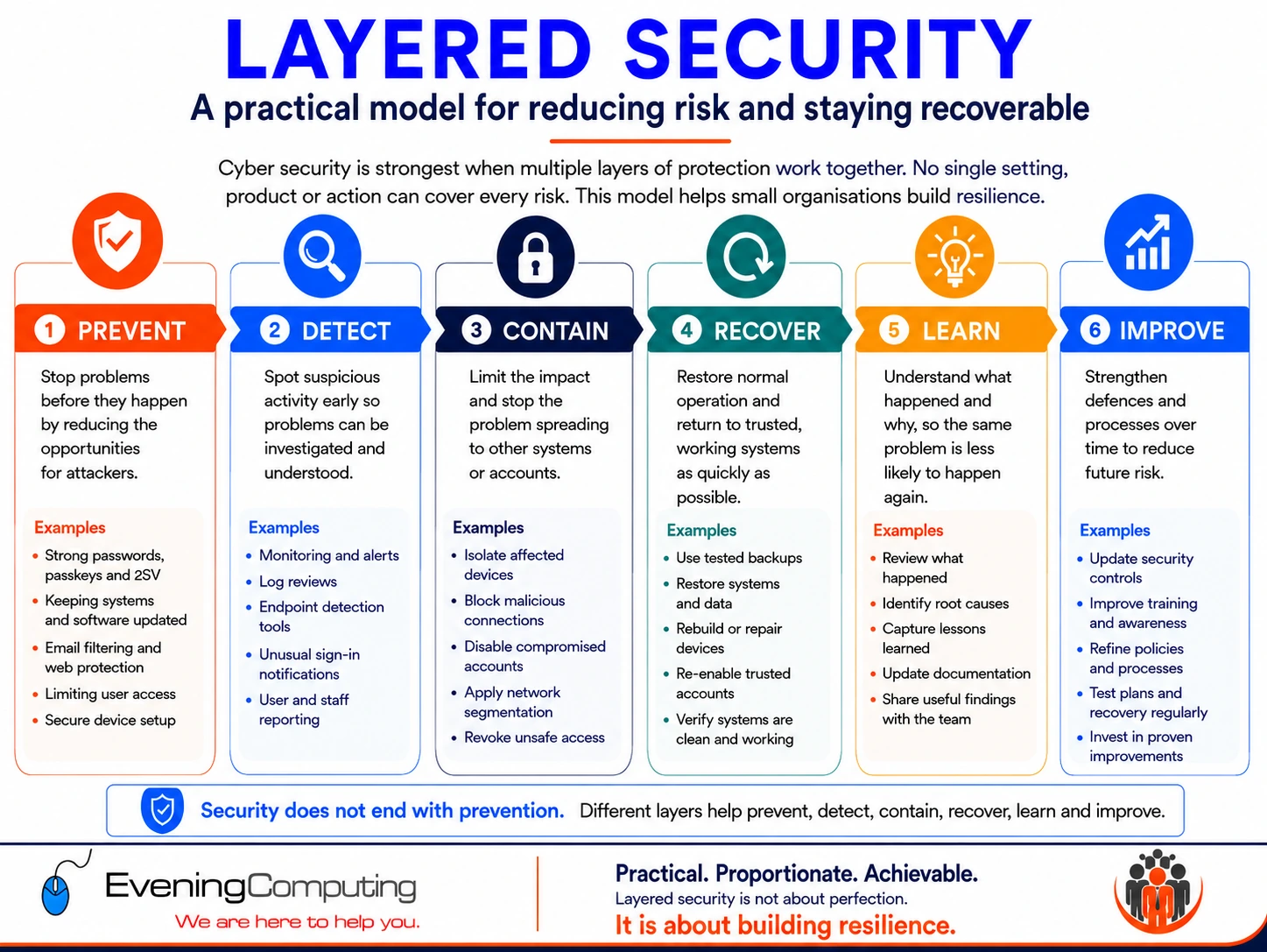
A useful way to understand the wider model is:
Prevent → Detect → Contain → Recover → Learn → Improve
Prevent problems where practical.
Detect unusual activity when prevention is not enough.
Contain the effect so that one problem does not automatically spread.
Recover important systems, information and access.
Learn what happened and which controls were insufficient.
Improve the environment before returning to normal operation.
Not every control belongs to only one stage, but this model makes an important point clear: security does not end with prevention.
Browse this guide
This guide covers layered security across devices, browsers, websites, networks, online accounts, and third party services. Use the links below to jump to the sections most relevant to your question.
- How layered security works in practice
- Watch our short video on layered security
- Why one setting or product is never enough
- Why attacks do not always look suspicious at first
- Why visibility across the organisation matters
- Why sign in protection is only one layer
- What layered security looks like in real environments
- Why third party services and suppliers matter
- Why identity and access are part of layered security
- Where zero trust fits
- Why data movement is part of layered security
- Real incidents that show why layers matter
- What layered security does not mean
- How to think about layered security in practice
- Further reading
- Related guides
- Need help with something covered in this guide?
- Further Guidance and Support
How layered security works in practice
Layered security works by reducing exposure at several points rather than assuming that one product, setting or security decision will always work perfectly.
A normal business activity might involve:
Device
↓
Local network
↓
DNS and internet connection
↓
Browser or application
↓
Identity and sign in
↓
Cloud service or business system
↓
Business information
Different controls act at different points in that path. Network rules may restrict unnecessary access. DNS filtering may stop some unsafe destinations. HTTPS may protect a web connection. Browser controls may warn about harmful behaviour. MFA or passkeys may strengthen authentication. Endpoint protection may identify suspicious activity on the device. Logging may help detect what has happened. Backups and recovery arrangements may become important if the earlier controls are not enough.
The same principle applies after something goes wrong:
Problem occurs
↓
Detect what has happened
↓
Contain the affected account, device or service
↓
Recover information, access or operation
↓
Understand the cause
↓
Improve the controls
This matters because modern systems are connected. Email, devices, websites, cloud platforms, suppliers, accounts and backups may all depend on one another.
If one of those systems is disrupted, the effect can quickly become a business continuity problem rather than only a technical problem. Layered security therefore aims both to reduce the likelihood of an incident and preserve a practical way to continue or recover when prevention fails.
Watch our short video on layered security
This short video gives a visual explanation of layered security and why relying on one product or one setting is rarely enough.
Why one setting or product is never enough
A common misunderstanding is that one strong control solves the whole problem. In reality, most security controls answer a narrower question.
A website can use HTTPS and still contain harmful content. A business can use multi factor authentication and still face session theft, unsafe application permissions or a compromised device. A WordPress site can use a security plugin and still depend on secure administration, supported software, hosting controls and recoverable backups. A laptop can have endpoint protection and still depend on its operating system, browser, network, applications and accounts.
Keeping systems supported and fully updated remains essential. Security updates correct many known vulnerabilities and software errors for which fixes are available.
However:
Fully updated
↓
known available fixes have been applied
↓
the software is still complex
↓
unknown or not yet fixed vulnerabilities may still exist
Modern operating systems, browsers, security products, network services, cloud platforms and applications contain large amounts of software. Vulnerabilities may exist before they are discovered. In some cases a weakness may already be known but an effective patch is not yet available, or attackers may begin exploiting it before every affected system can be protected.
This does not make updating less important. It explains why updating should sit inside a wider security model rather than being treated as proof that the system cannot be compromised.
The same principle applies to security products. A firewall, Endpoint Protection Platform, VPN, DNS filtering service or browser protection can substantially reduce particular risks without making every other layer unnecessary.
Preparation therefore matters alongside prevention. Backups, recovery accounts, network isolation, account revocation, supplier contacts, configuration records and rebuild procedures may only become important after something has already gone wrong, but they can determine whether an incident becomes a short interruption or a much longer disruption.
Good security is therefore less about finding one perfect product and more about making sure that prevention, detection, containment and recovery support one another.
Why attacks do not always look suspicious at first
Modern attacks do not always arrive through an obviously malicious website, email attachment or server. Some begin through familiar systems, ordinary accounts, trusted software, third party tools, remote access, browser sessions, cloud permissions or supplier access.
AI does not replace the older ways attacks begin. In many cases, it makes familiar risks faster, more convincing or easier to scale. A message, support request, login prompt, supplier instruction or account warning may look more natural and more closely related to the person or organisation being targeted.
Microsoft’s Digital Defense Report 2025 describes modern campaigns as multi stage attacks that can combine social engineering, technical exploits, device code phishing, infostealers and other access methods. In practical terms, this reinforces the layered security model rather than replacing it.
This is one reason layered security matters. A firewall, antivirus product or block list can reduce some risk, but those controls should sit alongside other measures such as device updates, account protection, multi factor authentication, DNS filtering, network segmentation, logging, backup resilience and periodic review
Two examples show why this wider view matters. Smart devices and ordinary network connected equipment can create risk if they are unsupported, poorly configured or connected to sensitive systems. Trusted software, plugins, developer tools and third party integrations can also create risk if they hold access that is not understood or regularly reviewed.
For more background, see our guides:
Can smart devices be a security risk?
Why visibility across the organisation matters
Layered security only works properly when the organisation knows what it is protecting.
Modern environments are not limited to a firewall, a few computers and a server. They often include cloud platforms, SaaS applications, APIs, remote support tools, supplier portals, identity systems, browsers, mobile devices, printers, cameras, smart devices and network connected sensors.
That means security cannot be treated as something handled only by IT after everything has already been installed. If a supplier, staff member or facilities team connects a new device or enables a new service without telling IT, that item may not be included in network segmentation, access review, monitoring, updates, backup planning or incident response.
Visibility also needs accountability. If staff, managers, suppliers or contractors introduce devices, apps, browser extensions, CCTV systems, meeting tools or cloud services without a clear owner, those systems may sit outside the intended security controls. This is especially important where personal devices are used for work, because the organisation may have limited visibility of encryption, updates, endpoint protection, local data storage and who else can use the device.
Layered security therefore depends on governance as well as tools. Someone must be responsible for deciding which devices and services are permitted, what minimum security controls apply, how exceptions are approved, and how access is removed when it is no longer needed.
AI tools and AI agents should be included in the same visibility process. The question is not only whether the tool is useful, but what it can access, what actions it can take, which systems trust its output, whether human approval is required for higher risk actions, and how its activity is logged.
Where AI tools can interact with files, email, calendars, APIs, supplier portals or business systems, they should be reviewed like other connected applications. Least privilege, monitoring, clear ownership and periodic review are still required.
This is one reason modern attacks can spread laterally across connected systems. The initial weakness may be small, but once access exists, attackers may try to pivot through accounts, devices, cloud services, SaaS applications and third party tools. Incident response reporting has repeatedly shown that significant incidents can involve several attack surfaces at the same time, including endpoints, networks, cloud infrastructure, SaaS applications and identity.
The practical lesson is simple: every connected device, account, supplier tool and cloud service should have an owner, a purpose, a known access level and a review path.
Visibility is also about response. If a supplier account, cloud application, browser extension, public facing service, personal device or connected system becomes a concern, the organisation should know how to check it, limit it, remove access where needed, and recover normal operation. A control is less useful if nobody knows who owns it or how quickly it can be acted on.
Why sign in protection is only one layer
Strong sign in is important, but it is only one part of layered security.
A passkey may protect the login process. A browser may include safe browsing protections. A device may have endpoint protection. A cloud account may use conditional access. A network may use DNS filtering. A backup system may support recovery. None of those controls replaces the others.
Modern attacks often move through several connected areas. An incident may begin with an unsafe page or download, then affect the browser session, then reach email, cloud storage, SaaS platforms, identity systems or third party tools.
This is why session protection matters. Google’s Device Bound Session Credentials are designed to reduce the value of stolen session cookies by binding sessions to the device. That is a useful additional layer, but it does not remove the need for secure devices, browser discipline, encryption, recovery planning, access review and supplier governance.
Device Bound Session Credentials provide a practical example of layered security in action. The underlying principle is more enduring than any particular product rollout: account protection does not end when authentication succeeds. The signed in browser session also needs protection because an attacker may try to reuse stolen cookies or tokens after the original sign in has already completed.
For small organisations, the practical lesson is simple: do not rely on one control. Strong authentication, device protection, browser security, DNS filtering, endpoint security, backup, supplier review and recovery planning all reduce different parts of the risk.
What layered security looks like in real environments
Layered security becomes easier to understand when it is viewed in normal situations rather than as an abstract concept.
Home computers and home networks
At home, layered security may begin before the user opens a browser at all. The router matters. WiFi security matters. The strength of the administrator password matters. The update state of the router matters. The DNS service being used may matter. The computer or phone itself may be encrypted or protected with screen locks and operating system security features.
Then the browser becomes another layer. Safe browsing protections, secure connection warnings, careful extension use, strong account sign in, and software updates all affect what happens next. Backups form another layer because prevention is not the same as recovery.
A person may think they are simply using a laptop to visit a website, but in reality they are often depending on the security of their home network, device, browser, account settings, cloud services, and backup arrangements at the same time.
Small offices and shared business networks
In a small office, the number of connected layers usually increases. There may be a business firewall, managed wireless access points, switches, VLANs, guest network separation, isolation for IoT devices, secure DNS or content filtering, endpoint protection, encryption, device management, account controls, and cloud backup services.
None of those layers replaces the others. Network segmentation does not replace account security. Endpoint protection does not replace browser discipline. DNS filtering does not replace updates. Backups do not replace prevention. What they do is reduce the chance that one problem spreads too far or remains unnoticed for too long.
This is especially important in shared environments where multiple people, devices, services, and suppliers interact. A small weakness in a shared business environment can affect more than one person or one device. That is one reason layered security matters so much for organisations, even small ones.
Websites and online services
A website may look simple from the outside, but it often depends on a long chain of moving parts. There may be the domain registrar, DNS provider, hosting platform, web server, content management system, plugins, themes, payment services, email services, backup services, CDN or WAF services, third party scripts, analytics tools, and the devices used to manage the site.
That means website security is not one thing. It may involve registrar account security, DNS integrity, hosting login protection, server maintenance, software versions, theme and plugin discipline, file permissions, payment flow review, email security, browser side protections, and recovery planning.
This also explains why one strong measure does not secure the whole site. A site may have secure hosting but still use poorly controlled plugins. It may have a WAF but still rely on weak account controls. It may use strong passwords but still load risky third party resources in the browser. Layered security helps reduce those blind spots.
Browsers, phones, and cloud accounts
Browsers and cloud accounts are now part of everyday infrastructure. They are not separate from security. They are part of it.
A browser may include safe browsing protections, secure connection warnings, secure DNS settings, extension controls, password storage, passkey support, download scanning, and background activity settings. A phone may depend on the mobile network provider, the phone manufacturer, the operating system, the app store, cloud sync services, messaging platforms, and account recovery methods. Cloud accounts may depend on password discipline, passkeys or multi factor authentication, delegated access, device trust, session control, and recovery settings.
Because these systems are used to sign in, manage data, and control other services, they are often part of the security chain for far more than one app or one website.
For a more detailed explanation of how browser protections, privacy controls, Secure DNS, extension use, and browser fingerprinting fit into this wider picture, see our guide on browser security and privacy.
Why third party services and suppliers matter
Many people think in terms of one device or one website, but most modern systems depend on a wider service chain. This is one of the main reasons layered security matters.
A website may rely on a registrar, DNS provider, hosting provider, CDN, email provider, payment provider, backup service, plugins, themes, analytics tools, and embedded scripts. A business computer may rely on the ISP, router, firewall, switches, wireless access points, DNS service, endpoint software, browser vendor, cloud backup provider, and operating system provider. A phone may rely on the carrier, the manufacturer, the operating system, app developers, the app store, messaging services, and cloud sync platforms.
This does not mean third party services are inherently unsafe. It means that security often depends on how those dependencies are chosen, limited, updated, reviewed, and monitored.
It also means that one weakness in the chain may affect a larger service. A plugin problem may affect a website. A browser extension issue may affect account use. A supplier account breach may affect administration access. A DNS mistake may affect where traffic goes. A poorly controlled third party integration may widen the exposure of a cloud platform.
That risk has become more important as businesses and individuals rely more heavily on cloud platforms, connected apps, and AI based tools. A third party service does not need to be malicious to create exposure. If it is granted unnecessarily broad permissions, stores tokens insecurely, or becomes compromised itself, it may give an attacker a way into data or systems that were never meant to be widely accessible. In that kind of situation, the problem is often not the idea of integration itself, but the scope of trust that was granted to it.
A documented WordPress supply chain incident illustrates this clearly. A previously trusted plugin portfolio was sold, malicious code was then added through the normal update process, and affected sites continued to look normal to their owners while hidden spam was served to search engines. The lesson is not that all third party tools are unsafe. It is that supplier trust, ownership change, update governance, monitoring, and recovery planning all matter because the weakness may sit in the trust chain rather than in one obvious configuration error.
Another documented example involved trusted software installers. Reporting on Daemon Tools described trojanised Windows installers being distributed through the software vendor’s own website and signed with legitimate digital certificates.
The lesson is not that official sources should be avoided. Official sources are still safer than random download sites. The lesson is that supplier trust should be supported by other layers, including endpoint protection, application control where appropriate, software inventory, monitoring, backup and recovery planning.
A realistic security guide therefore has to recognise the supplier chain rather than pretending that one organisation or one product controls everything.
Why identity and access are part of layered security
Identity is one of the most important layers because it often sits at the centre of many services. The way people sign in, reuse credentials, approve access, and manage permissions affects more than one system at once.
One of the most common weaknesses is password reuse. If the same password, or a very similar one, is used across several services, then a breach at one weaker service may create risk for the others. This is one reason password managers, passkeys, and unique credentials matter.
NCSC guidance encourages the use of passkeys where they are available. Where passkeys are not offered, strong unique passwords generated by a password manager and protected with 2SV remain the fallback. That fits naturally within a layered model because better authentication reduces the chance that one weak account becomes a path into wider systems. They are not only about convenience. They are about reducing the spread of risk across multiple accounts.
Single sign on and related sign in federation can improve this in some situations. Signing in with a major identity provider can reduce the number of passwords a user needs to create and remember, and it can avoid giving the same password to many different sites. But it also makes the protection of that main account more important, because one identity may now unlock access to several services.
It is also important to separate authentication from broader access. A person may sign in with Google or another provider without handing their main password to the third party service. That is not the same thing as granting ongoing access to email, contacts, files, calendars, or other data. Some services ask for wider permissions after sign in. If those permissions are granted, then the scope of trust becomes wider.
That distinction matters because a compromise at the third party service does not usually mean the identity provider itself has been compromised. More often, it means the attacker may gain access to whatever data or permissions that service already had on the user’s behalf. In other words, the risk often depends on what was granted, not only on how the sign in happened.
This has become even more important because attackers increasingly focus on identity, tokens, delegated access, and app permissions rather than trying to break through a traditional perimeter in the old sense.
A password may not need to be stolen if a session token can be captured, a device code can be abused, or a user can be persuaded to approve a malicious application.
That is one reason least privilege, careful application approval, strong multi factor authentication, passkeys where appropriate, and regular review of connected applications all belong within a layered model.
This is one reason identity, permissions, password reuse, password managers, passkeys, and account recovery methods belong inside a layered security guide. They are not isolated account topics. They affect the wider system.
Where zero trust fits
Zero trust is a modern security idea that fits naturally within layered security, but it should not be treated as if it replaces the broader concept.
In simple terms, zero trust means that trust should not be assumed automatically just because something is already inside the network, previously signed in, or connected from a familiar location. Identity, device state, access context, and ongoing verification matter more than simple perimeter assumptions.
This idea has become more important because many systems are no longer contained neatly within one office network. People work remotely, use cloud platforms, sign in from phones and laptops, connect through browsers, and rely on third party services. In that kind of environment, security based only on the idea of “inside equals trusted” becomes less realistic.
Zero trust is therefore useful here as one way of understanding why modern security relies more on identity, device trust, segmentation, least privilege, and verification across connected systems. It belongs inside the layered model, but it is not the whole model.
Why data movement is part of layered security
Layered security should also consider how data moves between systems. In many organisations, information moves through email, cloud storage, supplier portals, shared links, USB devices, website forms, remote access tools, automation services and business applications.
Connectivity does not automatically mean that the movement is safe. When data crosses from one system, supplier, device or cloud service to another, the organisation should understand who is allowed to send it, where it is allowed to go, whether it has been checked, and whether the receiving system should trust it.
This matters because attackers often look for weak points between systems rather than attacking one device in isolation. Data movement, supplier access, identity, permissions, logging and recovery planning should therefore be reviewed together rather than treated as separate topics.
Real incidents that show why layers matter
Layered security is not an abstract theory. It exists because single points of failure are common in real systems.
A website may appear normal while serving harmful content to visitors through injected JavaScript, a fake CAPTCHA overlay, or a compromised third party script. In that situation, the page may still load, and parts of the site may still seem to work. The weakness may not be obvious to the site owner or the visitor at first glance.
A service may use strong sign in protections and still be exposed if users are drawn into a phishing proxy that relays the real login process and captures session information. That does not mean multi factor authentication is useless. It means that one useful control still has limits, and that browser security, session protection, device security and user verification still matter.
A useful example comes from the WordPress ecosystem. In April 2026, more than 30 established plugins were closed after a supply chain compromise in which the buyer of the portfolio pushed backdoored updates, injected code into wp-config.php, and served malicious content only to Googlebot. The point is not only that plugins can be dangerous. The point is that ownership change, update trust, monitoring, backup separation and manual remediation may all become relevant at once.
These examples do not suggest that protection is pointless. They show why layered protection exists. Real incidents often involve several connected weaknesses rather than one dramatic break in one place.
The casino fish tank example
A well known example often used in cybersecurity discussions involved a casino aquarium that was connected to the organisation’s systems so water temperature and quality could be monitored. According to BBC News, the casino had ordinary protections such as firewalls and antivirus software, but the connected fish tank was still overlooked as part of the wider network.
The lesson is not that aquariums are the problem. The lesson is that any connected device can become part of the security chain. Smart TVs, cameras, printers, thermostats, access control systems, sensors and other network connected devices should not be treated as harmless simply because they are not traditional computers.
This is why layered security includes network segmentation, device inventory, firmware review, access control, monitoring and recovery planning. A firewall or antivirus product may help, but it does not remove the need to understand what is connected to the network and what each device can reach.
What layered security does not mean
Layered security does not mean perfect protection. It does not mean incidents become impossible, that every system needs enterprise level tooling, or that buying more products automatically produces better security.
It also does not mean that every layer must prevent an attack. Some controls exist to detect unusual behaviour. Some exist to contain an incident. Others exist specifically so that important systems, information or access can be recovered afterwards.
Being fully patched, using a firewall, running endpoint protection, enabling MFA or maintaining backups can each be very important. None of those statements means that the other layers are unnecessary.
The appropriate design depends on what is being protected, who uses it, what the realistic risks are, how much disruption the organisation could tolerate and what recovery would be possible if something went wrong.
Layered security therefore means taking a more realistic view:
Reduce what can go wrong
↓
Recognise when something has gone wrong
↓
Limit how far it can spread
↓
Recover what the organisation depends upon
↓
Learn and improve
It is not a promise of safety. It is a practical way of reducing avoidable risk while preserving options when prevention is not enough.
How to think about layered security in practice
A practical security review can begin with the systems and information the organisation genuinely depends upon.
A useful path is:
What would cause serious disruption if it stopped working?
↓
Which accounts, devices, suppliers and services control it?
↓
What access is genuinely required?
↓
Which controls help prevent a problem?
↓
How would unusual activity be detected?
↓
How could an affected account, device or service be contained?
↓
How would information, access or operation be recovered?
↓
How would the organisation continue while recovery takes place?
The answer may involve technical controls such as encryption, DNS filtering, network segmentation, endpoint protection, browser security and independent backups. It may also involve administrative controls such as removing unused accounts, reviewing supplier access, documenting important configurations and making ownership clear.
Business continuity belongs inside this review. A backup is valuable because it may provide a recovery copy of information, but continuity can also depend on emergency administrative access, alternative communications, replacement equipment, supplier contacts, configuration records or another way of continuing an essential process.
The objective is not to predict every possible incident. It is to avoid a situation where one unexpected failure leaves the organisation with no practical next step.
That is the enduring value of layered security:
Prevent where possible. Detect what gets through. Contain the effect. Recover what matters. Learn from what happened. Improve the environment.
Further reading
The following sources may be useful if you would like to explore the standards, terminology, and real world examples in more detail.
- BBC News: “It’s a hacker’s paradise out there”.
- cPanel: CVE 2026 41940 cPanel and WHM security update.
- Google Online Security Blog: Protecting Cookies with Device Bound Session Credentials.
- ICO: Guide to accountability and governance.
- Microsoft: Digital Defense Report 2025.
- National Cyber Security Centre: Annual Review 2025.
- National Cyber Security Centre: Passkeys.
- Palo Alto Networks Unit 42 incident response reporting.
- SecurityWeek: Google Rolls Out Cookie Theft Protections in Chrome.
- TechCrunch: WordPress plugin supply chain backdoor incident.
- Toronto Police Service: Arrests Made in Project Lighthouse, First of its Kind SMS Blaster Investigation in Canada.
- UK Government: Cyber Security Breaches Survey 2025 to 2026.
- Video explainer: The Hackers Who Used An Aquarium Thermostat To Rob A Casino.
- Virgin Media O2: warning about fake customer service numbers surfaced by AI tools and search engines.
How do cyber attacks usually start in small businesses?
WordPress Hardening for Small Organisations
Wordfence Security Settings Review
Fake CAPTCHA Malware on WordPress Websites Explained
WordPress security headers explained. A safe setup guide
Why trusted services can still be used in cyber attacks
Why DNSSEC matters and how DNS attacks can redirect internet traffic
Access all our IT Guides and Resources for Small Businesses and Individuals
Need help with something covered in this guide?
A guide can explain the issue and outline useful checks, but some situations need the actual device, account, service, website, network or supplier arrangement to be reviewed. Evening Computing can help review what is happening and advise on suitable next steps before changes are made.
Further Guidance and Support
This guide forms part of a broader layered security approach. For structured guidance on security and resilience planning, see our Security and Resilience page.
For information about practical implementation and ongoing support, you can review our IT services and local IT support coverage across London, Hertfordshire, and Essex.
Author
Elías Sánchez
IT Support Consultant
Evening Computing
This guide was prepared by Elías Sánchez with research and drafting assistance from AI tools. All technical content has been reviewed and adapted for clarity and accuracy.
Last reviewed
17 August 2026