
WordPress Hardening for Small Organisations
A WordPress website depends on more than the settings visible in the WordPress dashboard. Its security also depends on software updates, administrator access, plugins, themes, the hosting account, backups and connected services.
WordPress hardening is the process of reviewing those layers and reducing avoidable exposure. For a small organisation, this normally means keeping software supported, limiting administrative access, protecting sensitive configuration files, maintaining independent backups and monitoring for unexpected changes.
Hardening cannot guarantee that a website will never be compromised. Its purpose is to reduce the likelihood of an incident, limit the potential effect and make containment and recovery more manageable.
This guide sets out a practical production baseline. It explains what should be reviewed, why the main controls matter and where the correct configuration may depend on the hosting environment.
Guide overview
This guide explains the main controls that form a practical WordPress hardening baseline for a small organisation.
It covers:
-
- keeping WordPress and its components supported
- verifying that important security updates have completed successfully
- reviewing plugins, themes and their supplier dependencies
- file permissions and protection of
wp-config.php - administrator access and authentication
- hosting accounts and supplier responsibilities
- browser security headers, Content Security Policy (CSP), CDNs and independent website security checks
- independent backups, restoration testing and clean recovery
- monitoring, detection and incident preparation
By the end of the guide, you should understand how these controls work together, what they do not guarantee and which areas should be reviewed periodically.
Browse this guide
Use the links below to jump to the section most relevant to your question.
- Core configuration baseline
- Keeping WordPress and its components supported
- Plugin and theme supplier dependencies
- Verifying file permissions in practice
- wp-config.php hardening controls
- Identity and access discipline
- Hosting control panels and supplier patching
- Content Security Policy (CSP), hosting and Content Delivery Networks
- Backups, restoration and clean recovery
- Monitoring and detection
- Independent WordPress and security-header checks
- What WordPress hardening does not do
- Layered protection and resilience
- Related WordPress Security Guides
- Supporting References
- Further Guidance and Support
Core configuration baseline
WordPress hardening is not a single setting. It is a defined baseline of configuration controls that reduces unnecessary exposure and limits the potential effect of compromise involving credentials, software or suppliers.
The controls listed below form a practical production baseline for small organisations. Each is explained in more detail in the sections that follow.
-
- WordPress core, installed plugins, themes and underlying hosting components maintained on supported versions.
- Important security updates verified as successfully installed on the live website rather than assumed to have completed automatically.
- HTTPS enforced across the public website, login page and administration area.
- HTTP security headers, including Content Security Policy (CSP), reviewed against the website’s hosting arrangements and legitimate functionality; changes tested before enforcement.
- File ownership and permissions appropriate to the hosting environment, commonly 0755 for directories and 0644 for ordinary files under managed hosting.
wp-config.phpprotected with permissions that are as restrictive as the hosting ownership and execution model safely allows.- Dashboard file editing disabled using
define('DISALLOW_FILE_EDIT', true); - Unused plugins and themes removed rather than left inactive.
- Plugin and theme installation restricted to authorised administrator accounts.
- Installed plugins and themes documented in a simple inventory recording their purpose, source, current maintainer, update method and date of last review.
- Changes to ownership, maintainer, distribution channel, licensing, support arrangements or update behaviour treated as review triggers.
- Principle of least privilege applied to all WordPress roles.
- Lower privilege accounts used for routine publishing or content work where practical, with Administrator access reserved for work that genuinely requires it.
- WordPress Application Passwords, API integrations and service credentials reviewed periodically, with unused access revoked.
- Shared or generic administrator accounts avoided so that access and administrative actions remain attributable to an individual.
- Independent backups of the WordPress database and required website files maintained outside the live hosting environment, with multiple recovery points and periodic restoration testing.
- Appropriate monitoring enabled for file changes, unexpected administrator accounts, security events and other indicators of unauthorised activity.
- WordPress Administrator accounts, hosting control panels, domain registrar accounts, administrator email accounts, backup services, CDN or firewall services and other privileged web accounts protected with strong, unique credentials and multi-factor authentication where supported.
- SFTP, database, API and other service credentials limited to genuine requirements, stored securely and revoked or changed when they are no longer required or exposure cannot reasonably be ruled out.
HTTPS protects information exchanged between a visitor’s browser and the website, including login credentials and administrative sessions. It does not correct vulnerable software, weak administrator accounts or insecure hosting access. It should therefore be treated as one part of the wider hardening baseline rather than proof that the whole website is secure.
These measures do not guarantee immunity from compromise. They reduce avoidable exposure and support more effective detection, containment and recovery if an incident occurs.
A properly configured security plugin can also provide useful protection and monitoring features, including login protection, file integrity monitoring and firewall rules.
For organisations using WordPress, we have also published a detailed guide reviewing recommended Wordfence security settings and configuration considerations.
Keeping WordPress and its components supported
Keeping WordPress core, plugins and themes supported and updated is one of the most important parts of maintaining a production website.
Updates may correct security vulnerabilities, compatibility problems and functional defects. Leaving an installed component inactive does not remove its files from the hosting environment. Plugins and themes that are no longer required should therefore normally be deleted rather than merely deactivated.
Minor maintenance and security updates should normally be applied promptly. Major WordPress releases and substantial plugin or theme updates should be backed up and tested where practical, particularly where the website depends on customised functionality or integrations.
Automatic updates should not be disabled without a documented alternative process for reviewing and applying updates. Updates should also be supported by independent backups and a recovery procedure in case a compatibility problem is introduced.
After an important security release, the version running on the live website should be checked directly rather than assuming that an automatic update or an update initiated by the provider has completed. The result should be recorded where the website is being maintained under a formal support or security process.
The website should also be checked for normal operation after a significant update. Available security alerts, file integrity results and relevant logs should be reviewed where there is reason to believe that the website may have been exposed before the update was applied.
A successfully installed update addresses the vulnerability covered by that release. It does not by itself establish that the website was not altered before the update was installed.
This is especially important when a vulnerability is being actively exploited soon after public disclosure. In those situations, the maintenance task is not only to confirm that the update has installed. It may also be sensible to check for unexpected administrator accounts, unfamiliar plugins, altered files, suspicious uploads, unusual access logs or other changes that may have occurred before the site was patched.
The level of checking should be proportionate to the website, the vulnerability, the hosting environment and the importance of the site to the organisation. A small brochure website may require a different response from a website that handles user accounts, payments, bookings, forms or sensitive information.
The wider hosting environment should be reviewed periodically as well. WordPress may continue to operate on an older PHP, database, web server or control panel version after that component is no longer receiving normal security support.
Plugin and theme supplier dependencies
An installed plugin or theme is both a software component and an ongoing dependency on its developer, owner, update service and support arrangements.
A practical inventory should record:
- why the component is required
- where it was obtained
- who currently develops or maintains it
- how updates are delivered
- whether it connects to an external service
- whether it has access to sensitive information or administrative functions
- when it was last reviewed
- whether a realistic replacement is available
A change of ownership, maintainer, update service, distribution channel, licence or support arrangement does not by itself indicate that a component is unsafe. Businesses and software products are bought, sold and reorganised for many legitimate reasons.
However, such a change alters the organisation’s supplier relationship and previous trust assumptions. It should therefore prompt a proportionate review rather than waiting for the next routine security assessment.
The review should consider whether the component is still necessary, whether it remains actively supported, whether its recent update and communication pattern appears credible and whether any unexpected permissions, external connections or administrative requirements have been introduced.
Components that are no longer supported, have been removed from their normal distribution channel or cannot be maintained with reasonable confidence should be assessed for replacement. Disabling a component is not the same as removing its files, so an unused or untrusted component should normally be deleted after an appropriate backup and compatibility review.
Where a plugin or theme is important to the operation of the website, the organisation should also understand how the functionality could be replaced if development stops, the supplier changes direction or the product becomes unsuitable.
Documented WordPress incidents have shown that software distributed through a previously legitimate update route can still become unsafe if ownership, development systems or update infrastructure are compromised. Plugin review should therefore consider both the code installed today and the continuing reliability of the update relationship.
Verifying file permissions in practice
Correct file permissions are a foundational control in WordPress hardening. They determine who can read, write, and execute files within the hosting environment.
In most managed hosting environments, default directory permissions are 0755 and default file permissions are 0644. WordPress does not normally create plugin directories with 0777 permissions.
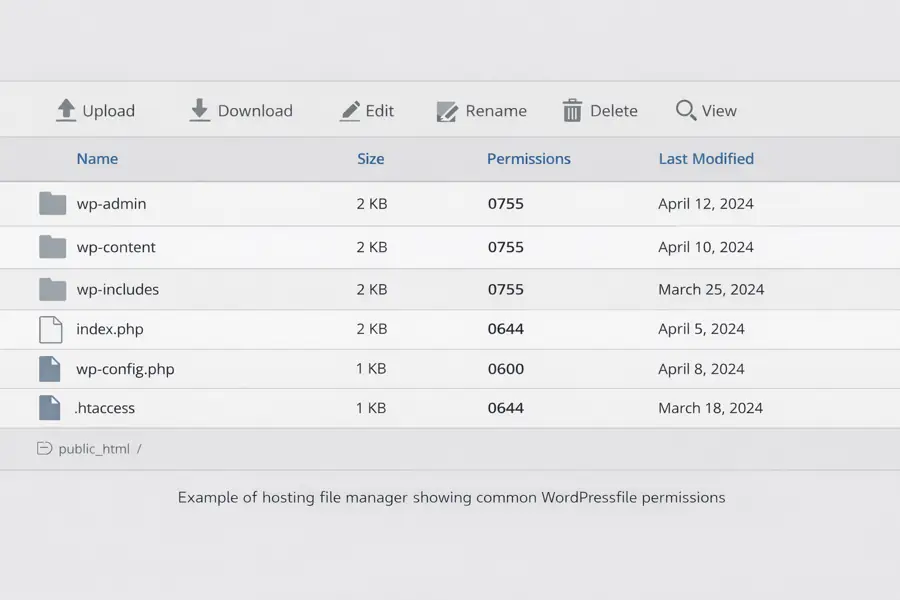
Example of a managed hosting file manager showing commonly used WordPress file permissions. Appropriate permissions may vary according to file ownership and the hosting environment.
If 0777 permissions are observed, they are typically the result of:
• A manual configuration change
• An insecure installation or repair script
• A migration or troubleshooting adjustment
• Post-compromise modification
Permissions should not be changed recursively across an entire WordPress installation without first understanding the hosting account’s file ownership and PHP execution model. A permission that is appropriate on one platform may prevent the website or its update process from working correctly on another.
Publicly writable directories significantly increase risk because they may allow unauthorised file uploads or modification.
Permissions should be verified using the hosting file manager or secure SFTP access. Verification should include the wp-content directory and any custom upload or plugin directories created by third-party extensions.
Assumptions should not be made based solely on suspicion. Configuration should be confirmed before concluding that a compromise has occurred.
File permissions should be checked after migrations, restoration work, manual repairs and significant hosting changes, as well as during periodic security reviews.
wp-config.php hardening controls
The wp-config.php file defines critical behaviour for a WordPress installation and should be treated as a protected configuration asset.
Permissions for wp-config.php should be restricted as far as the hosting environment safely permits. Depending on file ownership and the server configuration, suitable permissions may include 0600, 0400 or 0440. The file must remain readable by the processes legitimately required to run the website.
The following control should be enabled in production environments:
define(‘DISALLOW_FILE_EDIT’, true);
This prevents administrators from editing theme and plugin files directly through the WordPress dashboard. While convenient in development environments, dashboard file editing increases post-authentication attack surface if credentials are compromised.
Production environments should rely on version-controlled changes or secure file transfer methods rather than dashboard modification.
Additional production configuration checks commonly include:
WP_DEBUGset tofalseduring normal production operation.WP_DEBUG_DISPLAYset tofalseso that diagnostic information is not displayed to website visitors.- Temporary diagnostic logging disabled after troubleshooting has been completed.
- Any production logs that must be retained stored outside the publicly accessible website directory or otherwise protected from direct web access.
WP_ENVIRONMENT_TYPEidentified asproductionwhere explicit environment labelling is used.
These settings reduce the risk of diagnostic information being displayed publicly. They do not replace server-level logging, monitoring or a controlled troubleshooting process.
Identity and access discipline
Configuration hardening must be supported by disciplined identity management. Weak credentials, shared accounts or excessive permissions can undermine otherwise sound technical controls.
Each WordPress Administrator should have an individually assigned account protected by a strong, unique password and multi-factor authentication. On a self-hosted WordPress website, MFA normally requires a reputable security plugin or an external identity provider because it is not included in WordPress core.
Shared or generic administrator logins should be avoided because they make access removal, accountability and incident investigation more difficult.
Where practical, routine publishing and content work should be carried out through an Editor or another lower-privilege role. Administrator access should be reserved for work that genuinely requires it.
Multi-factor authentication should also be enabled for the hosting control panel, domain registrar, administrator email account, backup service, CDN or firewall service and other privileged web portals where the provider supports it. These accounts may provide control over the website, its files, DNS, recovery copies or security services and should not depend on a password alone.
WordPress Application Passwords and other integration credentials should be given descriptive names, limited to genuine requirements and revoked when the connected application or service is no longer used. They should be treated as sensitive credentials rather than ordinary website login passwords.
A record should also be kept of important integrations and service accounts, including their purpose, responsible owner and the system in which they can be revoked. This makes it easier to identify obsolete access and respond if a connected service, plugin or supplier relationship changes.
Following a suspected or confirmed compromise, WordPress accounts, hosting credentials, SFTP access, database credentials, Application Passwords and connected-service credentials should be assessed promptly. Credentials should be rotated wherever exposure cannot reasonably be ruled out, and active sessions should be invalidated where appropriate.
The principle of least privilege should be applied consistently. Users should only have the minimum level of access required to perform their role.
Hosting control panels and supplier patching
WordPress does not operate in isolation. A production website also depends on the hosting account, hosting control panel, domain registrar, database access, SFTP access, DNS provider, email provider, CDN or WAF provider where used, backup storage, administrator email accounts, supplier access and the provider responsible for patching the underlying platform.
Security advisories affecting hosting control panels demonstrate why this layer matters. In a managed hosting environment, the website owner may not control the underlying platform directly, but still depends on the provider applying security patches, protecting administrative access and investigating suspicious activity.
This does not mean that every hosting issue is visible from WordPress. It means WordPress hardening should be considered alongside hosting account security, provider patching, DNS control, backup separation and credential review.
The organisation should understand which parts of the environment it is responsible for updating and which are maintained by the hosting provider or another supplier. The word “managed” should not be treated as evidence that every WordPress component, external service or administrative account is included. Responsibilities should be confirmed through the provider’s documentation, support arrangements or service agreement.
Content Security Policy (CSP), hosting and Content Delivery Networks
A WordPress website depends on more than software installed in its dashboard. Pages can load JavaScript, stylesheets, fonts, images, forms and analytics resources from both the hosting server and external services. Content Security Policy (CSP) is one browser-side control that helps limit which resources can load or execute.
What CSP does
CSP is normally sent in an HTTP response header. The browser reads directives such as script-src, style-src, img-src, connect-src, frame-src, object-src, base-uri and form-action, then applies the permitted-source rules. A suitably restrictive policy can help reduce the effect of certain cross-site scripting (XSS) and content-injection attacks. It does not patch vulnerable plugins, secure administrator accounts or replace WordPress maintenance and backups.
What a CDN does
A Content Delivery Network (CDN) uses distributed infrastructure to deliver cached files or other website responses, often reducing origin-server requests and improving performance for visitors. WordPress and its database may still run at the original hosting provider. Depending on the CDN and subscription, additional functions may include DNS, HTTPS/TLS, DDoS protection, web application firewall rules, bot controls, analytics, caching and response-header management. These functions should not be assumed to be present or configured correctly by default.
Where CSP is configured
The hosting platform may add CSP through server settings or Apache .htaccess; a CDN may set or modify headers at the edge; some WordPress plugins can also add headers. Administrators should determine which component controls the final response received by the browser. Multiple enforced policies can restrict each other, and WordPress-generated or cached responses may behave differently. Avoid unnecessary duplication and document configuration ownership.
Why WordPress needs careful testing
Page builders and plugins may generate inline JavaScript, dynamic CSS and external connections. Analytics, embedded media, contact forms and anti-spam challenges can depend on additional sources. An overly restrictive CSP can prevent legitimate website features from loading, while broad permissions such as unsafe-inline for scripts can reduce protection. Nonces or hashes may help in suitable implementations, but can require engineering and ongoing maintenance.
How to introduce a policy
Start by identifying actual resources on representative public pages and important workflows. Develop a proposed policy, use Content-Security-Policy-Report-Only to observe potential violations without blocking resources, and establish a way to inspect reports or browser diagnostics. Test contact forms, navigation, the administration area and page-builder functionality. Refine the rules and consider enforcement only after compatibility and security value have been reviewed. A report-only header does not provide the restrictions of an enforced policy.
CSP is one layer of protection. A missing header does not prove compromise, and a high score from an automated tool does not establish that a website is secure.
Backups, restoration and clean recovery
Independent backups should include the WordPress database and the files required to restore or rebuild the website. Depending on the website, this may include uploaded media, custom code, configuration information and other content that cannot be recreated easily.
Backups should be held separately from the live hosting environment so that loss of the hosting account does not also remove every available recovery copy. Access to backup storage should be protected with strong credentials and multi-factor authentication where available.
Multiple recovery points should be retained. A single current backup may reproduce accidental deletion, corruption or unauthorised changes that were already present when the backup was created.
Restoration testing should confirm that the organisation can recover a functioning website and understands who has access to the hosting account, domain, DNS, database, backup storage and other services required during recovery.
A restoration test does not necessarily need to replace the live website. It may be completed in an isolated or temporary environment where the database, files, website operation and administrative access can be checked safely.
Where compromise is suspected, the newest backup should not automatically be assumed to be clean. Malicious or unauthorised changes may have remained unnoticed for a period before detection.
Clean recovery may therefore require identifying an earlier verified recovery point or rebuilding WordPress core, plugins and themes from trusted sources before restoring verified content and data.
Recovery should also include a review of:
-
- WordPress user accounts and active sessions
- hosting and SFTP credentials
- database credentials
- administrator email accounts
- Application Passwords and API credentials
- DNS, CDN and firewall access
- connected services and supplier accounts
Credentials should be changed where exposure cannot reasonably be ruled out, and unnecessary access should be revoked.
Backups support recovery, but they do not replace software updates, access controls, monitoring or incident investigation. Their value depends on whether they are independent, protected, sufficiently complete and capable of being restored.
Monitoring and detection
Hardening reduces exposure but does not eliminate risk. Monitoring provides visibility and supports earlier detection of unexpected or unauthorised activity.
A properly configured security plugin can enable file change monitoring, login protection and alerts for unexpected modifications or administrative activity.
Monitoring is only useful when alerts are delivered to an address or service that is actively reviewed. A small organisation should know who receives security notifications, which types of event require investigation and who is responsible for responding.
Hosting providers, CDN or firewall services and other suppliers may also provide malware scanning, integrity monitoring or security alerts. These tools complement controls within WordPress but should not be assumed to cover every part of the wider environment.
Periodic review should include:
-
- WordPress administrative accounts
- Application Passwords and integration credentials
- installed plugin and theme changes
- plugin or theme ownership and maintainer changes
- removal of components from their normal distribution channel
- failed login activity
- update history and current software versions
- significant hosting, firewall or malware alerts
- changes to backup status or restoration results
Important security updates should be checked on the live website to confirm that the expected version is actually running. An update notice or an enabled automatic update setting does not by itself confirm that installation completed successfully.
Monitoring should not stop at file change alerts alone. Periodic checks should also look for unexpected administrator accounts, modified core files, unusual outbound connections and signs that sensitive files such as wp-config.php have changed unexpectedly.
A file change alert does not automatically prove that a compromise has occurred. Legitimate updates and maintenance work also modify files. Alerts should therefore be interpreted alongside update history, administrator activity, logs and other available evidence.
Where a plugin or theme is suspected of distributing malicious code, disabling or deleting it is only one containment step. The wider installation should also be assessed for:
-
- unexpected files or modified core files
- unauthorised users or administrator accounts
- unfamiliar scheduled tasks
- unexpected database changes
- unusual external connections
- exposed credentials or Application Passwords
- changes to DNS, hosting or connected services
Applying an update or removing a suspicious component does not by itself demonstrate that the website was unaffected before the change was made.
Detection capabilities should support containment, investigation and recovery. They do not replace preventative configuration, supported software or independent backups.
Independent WordPress and security-header checks
Independent assessment tools can help identify issues that are visible from outside a WordPress website. The results are useful starting points for investigation, not substitutes for reviewing the software actually installed, administrator access, hosting, backups and monitoring.
BugShield’s free WordPress Vulnerability Scanner examines public WordPress, plugin and theme clues and compares identifiable versions with known vulnerability advisory records. It can provide useful leads without requiring a WordPress account or plugin installation. Public version hints may be incomplete, stale or misleading, and a scan that finds no matches does not establish that the website is safe. Confirm every match against the installed software and linked advisory before acting.
Mozilla HTTP Observatory and SecurityHeaders.com examine HTTP response headers and selected browser security controls, including CSP and HSTS. Their results measure different things from a WordPress vulnerability scan.
A website can receive a good result from a WordPress vulnerability scanner while performing poorly in a security-header assessment, or vice versa. This is because the tools examine different aspects of security. A site with well-configured headers may still use vulnerable components, while a site with no reported software vulnerability matches may lack important browser protections. The findings complement one another and should be checked against the wider website configuration.
You can find links to these independent assessment tools in the Supporting References section below.
What WordPress hardening does not do
WordPress hardening reduces avoidable exposure, but it does not make every component, supplier or connected service trustworthy.
Hardening does not:
-
- guarantee that WordPress core, a plugin or a theme will never contain a vulnerability
- guarantee that a component’s current owner, maintainer or update source will remain trustworthy
- compensate for unsupported software that is no longer receiving security fixes
- prove that an automatic update or an update initiated by the provider completed successfully
- prove that a website was not compromised before a vulnerability was patched
- prove that removing a suspicious plugin also removed every change it may have introduced
- protect the website if the hosting account, administrator email account or another critical service is compromised
- make every security alert evidence of an attack
- guarantee that the most recent backup is a clean recovery point
- replace independent backups and a tested recovery process
- remove the need to review access when staff, suppliers or responsibilities change
A website may therefore appear correctly configured while still depending on vulnerable software, an exposed supplier account, an unverified update or a backup that has never been restored.
The purpose of a hardening review is to examine these dependencies together rather than treating one setting, plugin, certificate or security product as proof that the whole environment is secure.
Layered protection and resilience
No single control secures a WordPress environment.
Effective protection relies on layered implementation across software maintenance, configuration, identity, monitoring, hosting controls, supplier management and independent backup strategy.
Plugin supply chain incidents demonstrate why correct configuration alone is not enough. Attackers may compromise a previously legitimate development or update route and distribute malicious code through a process that appears normal to the website owner.
These incidents reinforce the need to understand which extensions are installed, why they are required, who maintains them and whether their recent support and update behaviour remains credible.
The same principle applies to WordPress core. A minimal installation can still be affected by a vulnerability in the underlying platform, which is why supported software, prompt updates and verification of the live version remain necessary.
Security reviews should be periodic and also triggered by relevant events.
Relevant review triggers may include:
-
- a critical WordPress security release
- a plugin or theme ownership change
- a change of maintainer or update service
- removal of an extension from its normal directory
- an unexpected or unusually large software update
- a hosting migration or major platform change
- a change of administrator, employee or supplier
- an unexplained file or account change
- a failed backup or restoration test
- a significant security, firewall or malware alert
Monitoring, independent backups and a recovery plan remain necessary even when an update appears to have arrived through the normal WordPress process.
Security should be viewed as a continuing process rather than a one-time configuration task. As software, suppliers and business requirements change, the controls and responsibilities surrounding the website should be reviewed and adjusted.
Layered security does not eliminate risk. It reduces likelihood, limits potential impact and improves the organisation’s ability to detect, contain and recover from an incident.
The same principle applies beyond WordPress. The hosting platform, DNS provider, domain registrar, email service, administrator accounts, CDN or firewall service and backup location should all be included in the wider review.
- What is layered security and why does it matter?
- How do cyber attacks usually start in small businesses?
- How do software supply chain attacks happen?
- Fake CAPTCHA Malware on WordPress Websites Explained
- Wordfence Security Settings Review
- WordPress security headers explained. A safe setup guide
- Access all our IT Guides and Resources for Small Businesses and Individuals
Supporting References
The technical guidance on this page draws primarily on official WordPress documentation covering hardening, updates, HTTPS, backups, Application Passwords, security releases and supported server software.
The practical examples are also informed by public reporting on WordPress plugin supply chain incidents and by supplier advisories relating to hosting control panel vulnerabilities. These incidents are used to explain why changes to ownership, maintenance and update delivery should prompt review. A commercial ownership change does not by itself establish that a product or supplier is unsafe.
External resource note:
Official WordPress guidance
WordPress Developer Resources: Hardening WordPress
WordPress Developer Resources: Upgrading WordPress
WordPress Developer Resources: HTTPS
WordPress Developer Resources: Backups
WordPress Developer Resources: Application Passwords
WordPress requirements and supported server software
WordPress: WordPress 7.0.2 security release
Supplier advisories and documented incidents
cPanel: CVE 2026 41940 cPanel and WHM security update.
TechCrunch: WordPress plugin supply chain backdoor incident.
Anchor Hosting: WordPress plugin supply chain incident.
The Hacker News: wp2shell WordPress core vulnerability report
The Register: Attackers pummel critical WordPress vulnerability after public disclosure and patches
CSP and independent website testing
Further Guidance and Support
This guide forms part of a broader layered security approach. For structured guidance on security and resilience planning, see our Security and Resilience page.
For information about practical implementation and ongoing support, you can review our IT services and local IT support coverage across London, Hertfordshire, and Essex.
Author
Elías Sánchez
IT Support Consultant
Evening Computing
London, United Kingdom
This guide was prepared by Elías Sánchez with research and drafting assistance from AI tools. All technical content has been reviewed and adapted for clarity and accuracy.
Last reviewed
12 October 2026