
WordPress Hardening for Small Organisations
WordPress hardening is the process of reducing unnecessary exposure within a WordPress environment by applying a defined configuration baseline and disciplined access controls.
This guide sets out a practical hardening framework derived from operational configuration review and observed incident patterns. It focuses on structural controls rather than individual plugins or isolated settings.
This is not a definitive or permanent checklist. Technology changes, new vulnerabilities are discovered, hosting environments evolve, and threat methods adapt over time. Hardening should therefore be reviewed periodically rather than implemented once and forgotten.
The objective is not absolute protection. It is structured risk reduction through layered controls that reduce attack surface, limit the impact of compromise, and support faster containment if an incident occurs.
Guide overview
Purpose
To define a practical WordPress hardening baseline suitable for small organisations operating in production environments.
Structure
This guide first defines the core configuration baseline.
It then explains how file permissions should be verified in practice, outlines wp-config hardening controls, addresses identity and access discipline, and concludes with monitoring and layered resilience alignment.
Outcome
By the end of this guide, you should understand which controls form a secure WordPress baseline and why layered implementation is more effective than relying on any single security feature.
Core configuration baseline
WordPress hardening is not a single setting. It is a defined baseline of configuration controls that reduce unnecessary exposure and limit the impact of credential or plugin level compromise.
The controls listed below form a practical production baseline for small organisations. Each is explained in more detail in the sections that follow.
• File permissions set correctly. Directories typically 0755 and files 0644 under managed hosting environments.
• wp-config.php protected with restrictive permissions, commonly 0600 where supported.
• Dashboard file editing disabled using define(‘DISALLOW_FILE_EDIT’, true);
• Unused plugins and themes removed rather than left inactive.
• Plugin installation restricted to authorised administrator accounts only.
• Principle of least privilege applied to all WordPress roles.
• Administrator accounts separated from standard user accounts.
• Independent off-site backups maintained outside the hosting environment.
• File integrity monitoring enabled through a properly configured security plugin.
• Hosting control panel, SFTP, database, and associated service accounts protected with strong, unique credentials and multi-factor authentication where available.
These measures do not guarantee immunity from compromise. They reduce attack surface and support faster containment if an incident occurs.
A properly configured security plugin can also provide valuable monitoring and protection features, such as login protection, file integrity monitoring, and firewall rules.
For organisations using WordPress, we have also published a detailed guide reviewing recommended Wordfence security settings and configuration considerations.
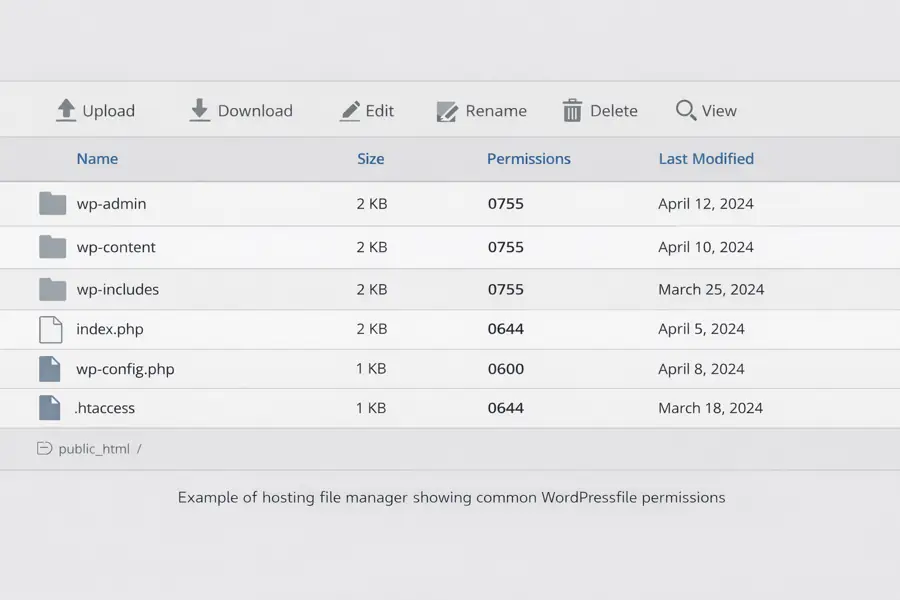
Example of a hosting file manager view showing standard WordPress file permissions.
Verifying file permissions in practice
Correct file permissions are a foundational control in WordPress hardening. They determine who can read, write, and execute files within the hosting environment.
In most managed hosting environments, default directory permissions are 0755 and default file permissions are 0644. WordPress does not normally create plugin directories with 0777 permissions.
If 0777 permissions are observed, they are typically the result of:
• A manual configuration change
• An insecure installation or repair script
• A migration or troubleshooting adjustment
• Post-compromise modification
Publicly writable directories significantly increase risk because they may allow unauthorised file uploads or modification.
Permissions should be verified using the hosting file manager or secure SFTP access. Verification should include the wp-content directory and any custom upload or plugin directories created by third-party extensions.
Assumptions should not be made based solely on suspicion. Configuration should be confirmed before concluding that a compromise has occurred.
Regular review of file permissions forms part of ongoing operational discipline rather than emergency response.
wp-config hardening controls
The wp-config.php file defines critical behaviour for a WordPress installation and should be treated as a protected configuration asset.
File permissions for wp-config.php are commonly set to 0600 where supported by the hosting environment, limiting access to the account owner.
The following control should be enabled in production environments:
define(‘DISALLOW_FILE_EDIT’, true);
This prevents administrators from editing theme and plugin files directly through the WordPress dashboard. While convenient in development environments, dashboard file editing increases post-authentication attack surface if credentials are compromised.
Production environments should rely on version-controlled changes or secure file transfer methods rather than dashboard modification.
Additional production controls commonly include:
• WP_DEBUG set to false
• WP_DEBUG_LOG disabled in production environments
• WP_ENVIRONMENT_TYPE set to ‘production’
These controls reduce information exposure and enforce environment discipline.
Identity and access discipline
Configuration hardening must be supported by disciplined identity management. Weak credentials or excessive permissions can undermine otherwise sound configuration.
Administrator accounts should use strong, unique passwords and multi-factor authentication where supported. Shared administrator logins should be avoided.
Separate administrator accounts should be maintained for administrative tasks rather than using a single shared login.
Hosting control panels, SFTP accounts, database credentials, and associated service accounts should also use unique passwords and multi-factor authentication where available.
After any security incident, credential rotation should be considered across WordPress, hosting, and related services.
The principle of least privilege should be applied consistently. Users should only have the minimum level of access required to perform their role.
Monitoring and detection
Hardening reduces exposure but does not eliminate risk. Monitoring provides visibility and supports early detection.
A properly configured security plugin can enable file change monitoring and alert administrators to unexpected modifications.
Hosting providers may also provide malware scanning and integrity monitoring. These tools complement application-level controls.
Log awareness, periodic review of administrative accounts, and plugin update monitoring form part of ongoing operational resilience.
Detection capabilities should support containment and investigation, not replace preventative configuration.
Layered protection and resilience
No single control secures a WordPress environment.
Effective protection relies on layered implementation across configuration, identity, monitoring, hosting controls, and independent backup strategy.
Security should be viewed as a continuous process rather than a one-time configuration task. As software evolves and new vulnerabilities are identified, controls should be reviewed and adjusted accordingly.
Layered security does not eliminate risk. It reduces likelihood, limits impact, and improves recovery capability.
Related WordPress Security Guides
Further Guidance and Support
This guide forms part of a broader layered security approach. For structured guidance on security and resilience planning, see our Security and Resilience page.
For information about practical implementation and ongoing support, you can review our IT services and local IT support coverage across London, Hertfordshire, and Essex.
Author
Elías Sánchez
IT Support Consultant
Evening Computing
London, United Kingdom
This guide was prepared by Elías Sánchez with research and drafting assistance from AI tools. All technical content has been reviewed and adapted for clarity and accuracy.
Last reviewed
15 March 2026